Core Features

Specialized Agents

Agents are specialized AI assistants that the main Agent can delegate complex tasks to. Each Agent runs in its own context window with independent system prompts and dedicated tool permissions, returning results to the parent Agent upon completion.

Key Advantages

AdvantageDescription
Context IsolationIsolate exploration and implementation work in separate conversations, keeping the main conversation context clean
Enforced ConstraintsLimit the tools available to each Agent, ensuring safe and controlled operations
Reusable ConfigurationShare Agent configurations across projects to improve team collaboration
Specialized BehaviorCustomize system prompts for specific domains to provide expert-level support
Cost ControlRoute tasks to faster, more economical models to optimize resource usage

Usage

Invoking an Agent

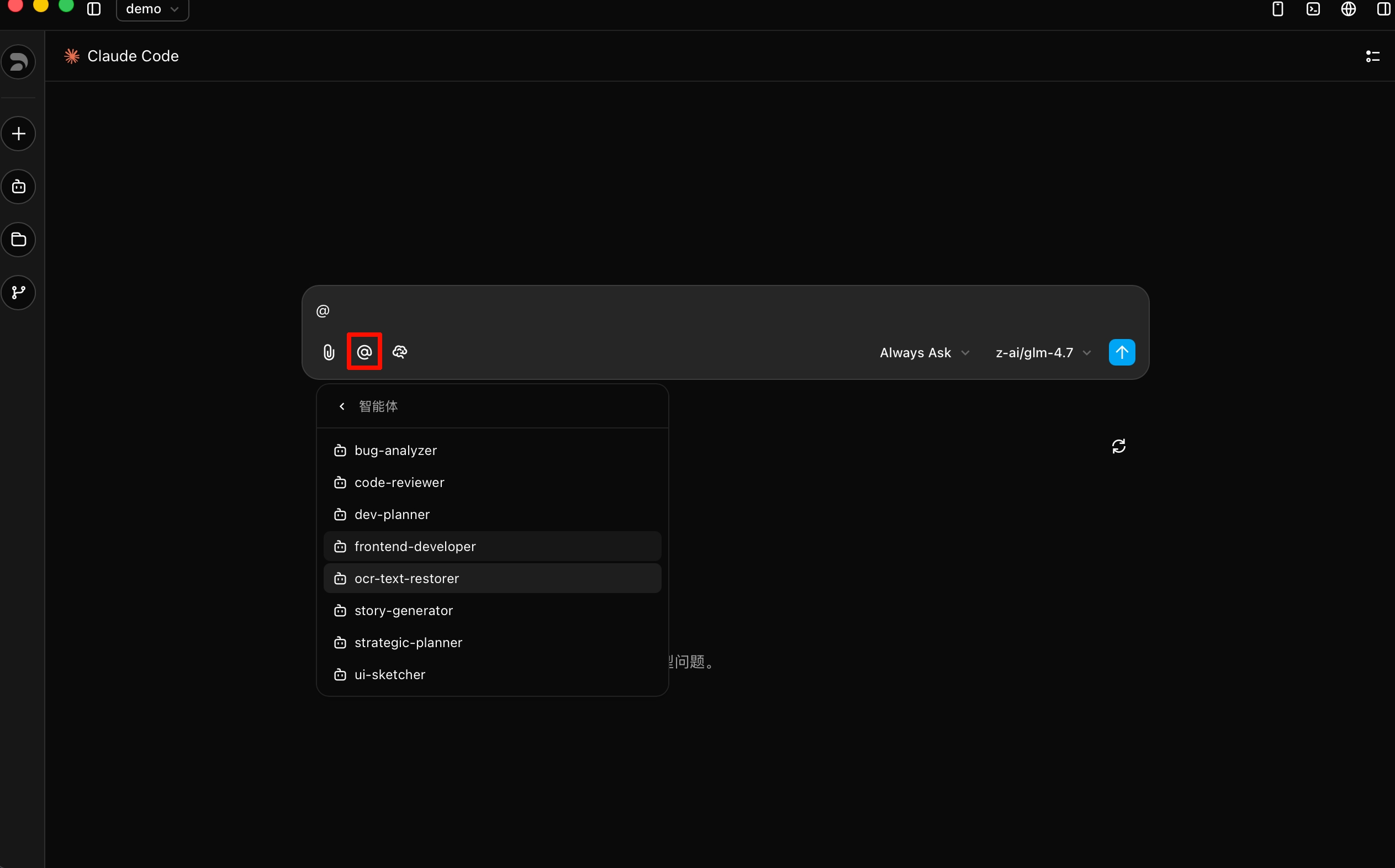
Type @ in the chat input to bring up the Agents list, then select the target Agent to start specialized collaboration.

Invoke Agents

Invocation Methods

Automatic: The Agent will automatically delegate matching tasks based on task complexity and the Agent's description.

Explicit: Use @name syntax in the chat to directly specify:

@code-reviewer Review the payment module
@bug-analyzer Investigate this error
@dev-planner Break down the user registration feature development plan

Parallel Execution: Launch multiple Agents simultaneously to handle different tasks in parallel:

Review API changes and update documentation in parallel

Built-in Agents

Z Code includes several built-in Agents that can be automatically invoked in appropriate scenarios:

AgentDescription
bug-analyzerProfessional debugging expert focused on deep code execution flow analysis and root cause investigation
code-reviewerCode review expert skilled in security vulnerability detection, performance optimization, and production reliability
dev-plannerDevelopment planner that breaks down requirements into actionable plans with task decomposition, dependency analysis, and timeline estimation
story-generatorUser story generation expert that creates stories with acceptance criteria from git diffs, PRD documents, and more
ui-sketcherUI blueprint engineer that transforms feature requirements into visual ASCII interface designs and interaction specifications

Custom Agents

You can create custom Agents in two ways: via the Settings UI or via configuration files.

Option 1: Via Settings UI

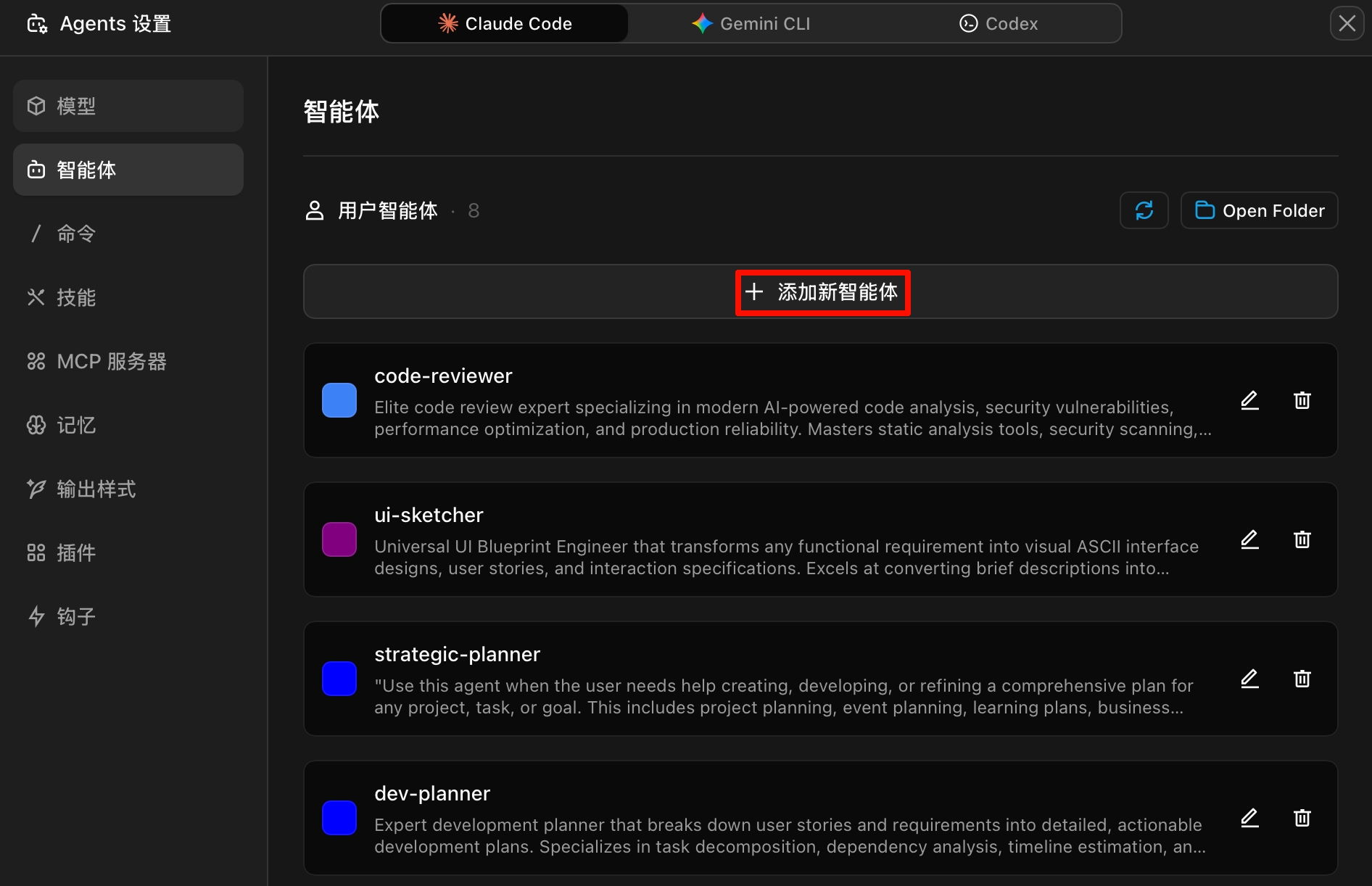
From Settings, enter the Agents management interface where you can view all available Agents (built-in, user-level, project-level), and edit, delete, or create them.

Agent Management Interface

Click Add New Agent and fill in the fields as shown:

Create New Agent

Option 2: Via Configuration Files

You can also create Agents through Markdown files, supporting two scopes:

TypeLocationScope
Project-level.zcode/agents/Current project only
User-level~/.zcode/agents/All projects

Create a .md file with YAML frontmatter:

---
name: security-auditor
description: Security expert. Use when implementing authentication, payments, or handling sensitive data.
model: inherit
---
You are a security expert responsible for reviewing code vulnerabilities.
When executing:
1. Identify security-sensitive code paths
2. Check for common vulnerabilities (injection, XSS, authentication bypass)
3. Verify secrets are not hardcoded
4. Review input validation and sanitization
Report findings by severity:
- Critical (must fix before deployment)
- High (fix as soon as possible)
- Medium (address when available)

Configuration Field Reference:

FieldRequiredDescription
nameNoUnique identifier using lowercase letters and hyphens
descriptionNoDescribes when to use this Agent, determines automatic invocation timing
modelNoModel to use: fast, inherit, or a specific model ID

Common Agent Examples

Verifier

---
name: verifier
description: Verify completed work. Use after a task is marked as done to confirm the implementation actually works.
model: fast
---
You are a rigorous verifier. Your job is to verify that work claimed to be complete actually works.
When executing:
1. Identify what is claimed to be completed
2. Check if the implementation exists and is functional
3. Run relevant tests or verification steps
4. Look for edge cases that may have been missed

Debugger

---
name: debugger
description: Debugging expert for errors and test failures. Use when encountering issues.
---
You are an expert debugger specializing in root cause analysis.
When executing:
1. Capture error messages and stack traces
2. Identify reproduction steps
3. Locate the point of failure
4. Implement minimal fixes
5. Verify the solution works

Test Runner

---
name: test-runner
description: Test automation expert. Proactively run tests and fix failures.
---
You are a test automation expert.
When you see code changes, proactively run appropriate tests.
If tests fail:
1. Analyze failure output
2. Identify the root cause
3. Fix the issue while preserving test intent
4. Re-run to verify

Best Practices

✅ Recommended❌ Avoid
Each Agent focuses on a single, well-defined responsibilityVague descriptions (e.g., "for general tasks")
Invest time in the Description field—it determines auto-invocationOverly long prompts (2000+ words)
Keep system prompts concise and clearCreating too many generic Agents
Add .zcode/agents/ to version controlDuplicating Commands functionality
Start with 2-3 focused Agents and expand gradually

Main Chat vs Agents

Use Main ChatUse Agents
Frequent iteration and interactive refinementTasks generating large outputs not needed in main conversation
Multiple stages sharing significant contextNeed to enforce specific tool restrictions or permissions
Quick, targeted modificationsWork is self-contained and can return summarized results
Latency-sensitive operationsNeed specialized knowledge across multiple steps
Running multiple independent workflows in parallel

Next Steps