Build Your First Web App

Why Build Your Own Instead of Using Existing Tools?
Gamma, Beautiful.ai, Canva AI, Tome... These tools are excellent.
But they all share common problems: Removing watermarks requires payment, you can only use built-in models—want to integrate Nanobanana Pro, GLM-Image, or your own fine-tuned model? No way. Your data gets uploaded to their servers with no privacy guarantee, and custom feature requests take forever.
Build your own with Z Code, in 15 minutes you can have a completely yours, unlimited, commercializable AI product.
What Do You Get by Building with Z Code?
- Streaming + Concurrent Generation — See results as they generate, 8 images running at once
- Custom Models — Integrate any model you want: GLM, GPT, Claude, Gemini... you decide
- Full Transparency — Every image prompt visible, editable, optimizable
- Data Security — Local processing, sensitive info never leaves your system
- Zero Limits — No watermarks, no paywalls, fully commercializable
Z Code's AI Agent handles all technical details—streaming parsing, concurrency control, fullscreen previewer. You just tell it "what you want".
In the next 15 minutes, we will use Z Code to build an AI PPT Generator that is truly yours
Are you ready? Let's begin this exciting journey.
15 Minutes, 3 Steps

This is the power of Z Code.
In traditional development, a complete product with streaming output, batch image generation, and a professional previewer could take a team weeks. Now, with just 3 prompts, Z Code's AI Agent can:
- Auto-scaffold the project — Initialize a Next.js project from scratch with complete dependencies
- Generate thousands of lines of code — Frontend components, backend APIs, business logic all at once
- Complete complex integrations — Streaming output, concurrency control, file export all ready
- Create professional interfaces — Responsive design, keyboard shortcuts, dark theme included
Build Roadmap
| Step | Time | What You Will Build | What Z Code Does |
|---|---|---|---|
| Step 1 | 5 min | Beautiful Homepage + Backend API | Generates 10+ components, configures API routes |
| Step 2 | 7 min | Streaming + Batch Images + Previewer | Implements SSE parsing, concurrency controller, fullscreen preview |
| Step 3 | 3 min | History Records + Auto-save | Builds local storage solution, adds work management |
Why This Project
- Practical — This is a real product you can use, not a demo
- Complete Experience — Covers frontend, backend, and AI integration
- Satisfying — In 15 minutes, you'll have something to show your friends
Final Product Highlights
| Feature | Description |
|---|---|
| Real-time Generation | Outline appears line by line like a typewriter |
| Smart Images | AI processes multiple images concurrently with visible progress |
| Professional Preview | Fullscreen dark interface, three-column layout, keyboard navigation |
| Multi-format Export | PPT, PDF, or image ZIP—take your pick |
| Work Memory | Close and reopen—your previous work is still there |
Ready? Let's start with Step 1.
Step 1: Build a Beautiful Homepage
Estimated Time — 5 minutes
What We Are Building

In this step, we'll have Z Code build:
- Page Layout — Create navigation bar, main content area, control panel
- Topic Input Component — Large input box with placeholder for entering PPT topics
- Preset Tags System — Clickable scenario tags that auto-fill the input
- Config Selectors — Page count (6/8/10/12), text model, image model selection
- Routing Logic — Start Forging button redirects with user-selected parameters
- Backend APIs — Text generation and image generation endpoints
Recommended Models
| Model Type | Recommended | Description |
|---|---|---|
| Text Generation | GLM-4.7 / GLM-4.7-FlashX / GLM-4.7-Flash | For generating PPT outlines, titles, and content points |
| Image Generation | GLM-Image (Industry-leading text rendering, open-source SOTA) | Creates beautiful images for each slide |
Let's Begin
Copy the prompt below and send it to Z Code. You can click "Copy to Z Code" button for one-click convenience:
Configuration Tips
Before using, replace{BASE_URL}and{YOUR_API_KEY}in the prompt with actual values:
Config Item China Users International Users Base URL https://open.bigmodel.cn/api/paas/v4https://api.z.ai/v1API Key Get from Zhipu Open Platform Get from Z.AI
Build an AI PPT generator with Next.js 15 + TypeScript + Tailwind CSS.

Homepage (src/app/page.tsx)

Modern minimal style, light theme. Include:

1. Top navbar with logo "Z Code Slides", right menu: Overview, Features, Library, Share and Collaborate button
2. Large title "Presentations, Reimagined", subtitle "Transform your ideas into professional presentations instantly"
3. Large rounded textarea for PPT topic input, with "Random Inspiration" button in top-right corner
   Preset prompt buttons in two rows, popular scenarios:
   - Row 1: "Planning", "2026 Global Tech Trends Analysis Report", "Q4 Marketing Review & Planning", "New Energy Solution Pitch"
   - Row 2: "Explore", "ESG Sustainability Report", "Cross-border E-commerce Guide", "Team Collaboration Efficiency", "Investor Pitch"
4. Right control panel:
   - Page count selection: 6/8/10/12 pages, grid buttons
   - Text model selection: GLM-4.7 / GLM-4.7-FlashX / GLM-4.7-Flash
   - Image model selection: GLM-Image
5. Blue "Start Forging" button, redirects to /generate page,
   URL with params: topic, pages, textModel, imageModel

API Route /api/chat (src/app/api/chat/route.ts)

Call Zhipu Open Platform API (China) or Z.AI API (International):
- Default model: glm-4.7-flash
- Support streaming: when stream=true return SSE
- Forward messages to {BASE_URL}/chat/completions
- Headers: Authorization Bearer {YOUR_API_KEY}

API Route /api/generate-image (src/app/api/generate-image/route.ts)

Call Zhipu image generation model:
- Default model: GLM-Image
- Add size: 1440x816 (16:9 ratio) in request body
- Return format: data array with url field
Send it, refresh the browser, and your homepage appears!
Step 2: Make AI Come Alive
Estimated Time — 7 minutes

In this step, we'll make AI truly come alive—enter a topic, watch the outline generate line by line, then generate all images with one click.
What You Will Get
After completing this step, your product will have:
- Streaming Generation — Outline appears line by line like typing, very smooth experience
- Batch Image Generation — Click "Generate All Images" and AI processes multiple images simultaneously
- Professional Previewer — Fullscreen view of each page, adjust prompts and regenerate anytime

Core features of the previewer:
- AI-Optimized Prompts — Every image prompt is editable, adjust anytime if not satisfied
- Single Image Regenerate — Click "Regenerate" for any page, no need to rerun the entire set
- Multi-format Export — PPT / PDF / Image ZIP, one-click download
Let's Continue
Build the generate page /generate (src/app/generate/GenerateContent.tsx)

Core Features

1. Get topic, pages, textModel, imageModel from URL searchParams
2. Auto-call /api/chat on page load to generate PPT outline

Outline Generation

Call /api/chat with stream: true, System Prompt requires AI to:
- Output JSONL format, one JSON per line:
  page_number, title, content array, image_prompt
- Keep consistent style across the entire PPT, choose design system at the beginning
- image_prompt must include complete text content description

Streaming parsing:
- Use ReadableStream reader
- Parse SSE data lines
- Each time a JSON line is parsed, add a card to slides array
- UI shows in real-time: page badge + title (editable) + bullet list + image description

Step Indicator

Top three-step indicator: Generate Outline - Edit Content - Generate Images
Current step highlighted, completed steps show green check

Batch Image Generation

Create new /api/generate-images batch endpoint:
- Concurrency controller, max 3 concurrent
- Each image task with retry (3 times), exponential backoff delay
- Timeout 120 seconds
- Frontend shows progress overlay: "Generating images x/y"

Professional Previewer

Fullscreen modal (z-70), dark theme:
- Left: thumbnail list, 16:9 ratio
- Center: large image preview, rounded shadow
- Right: edit panel
  - Slide info, statistics cards
  - Image description textarea (editable)
  - "AI Optimize Prompt" button
  - "Regenerate Image" button
- Top toolbar: Export PPT / PDF / Images buttons
- Bottom: keyboard shortcut hints: left/right arrows to navigate, ESC to exit

Export APIs

/api/export/ppt: Use pptxgenjs to generate PPTX, image as fullscreen background
/api/export/pdf: Generate PDF
/api/export/images: Package as ZIP
After this step, core functionality is complete. We're almost there!
Step 3: Make the Product Remember You
Estimated Time — 3 minutes
Why This Feature Matters
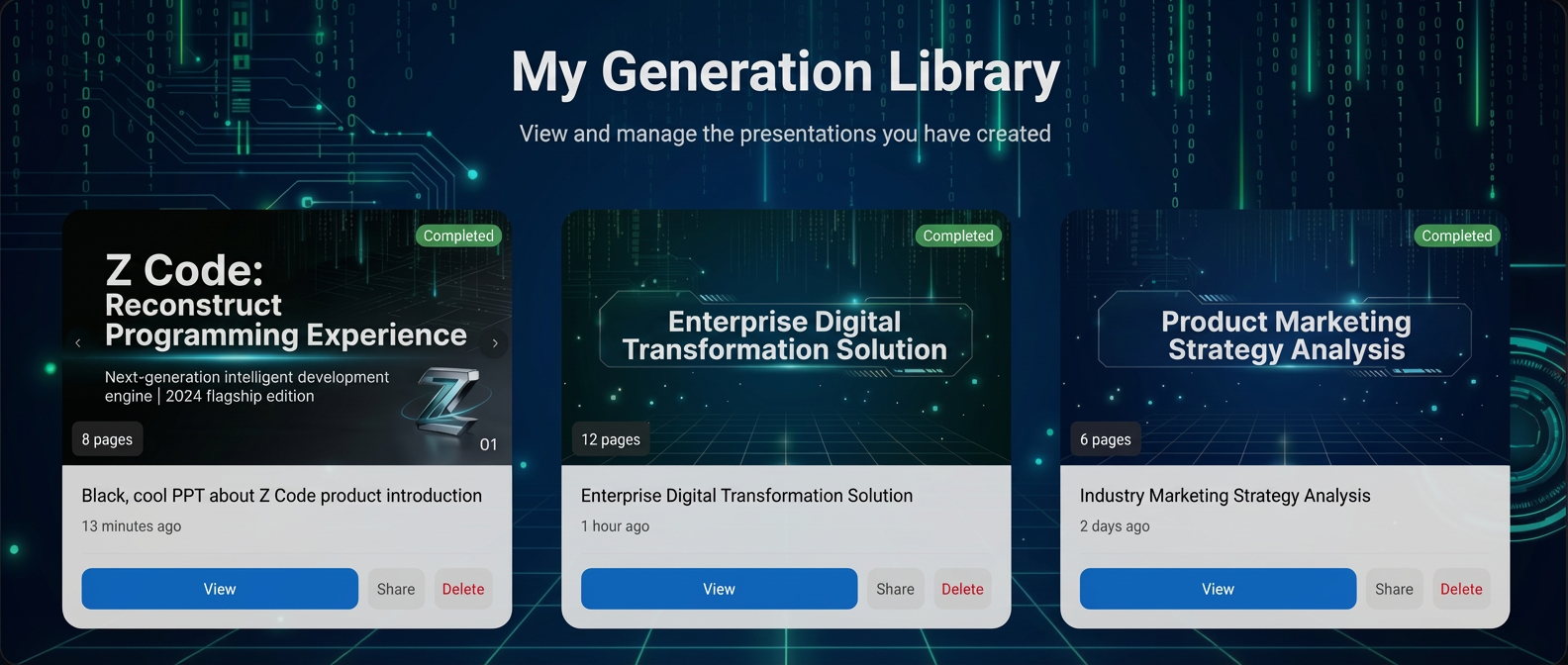
Imagine: you spend ten minutes generating a perfect PPT, close the browser for a coffee break, come back and... it's gone?
That's unacceptable. Good products remember user work:
- Work Library — Next time you open, all previous work is there
- Resume Work — Click to continue editing and exporting
Final Step
Copy the prompt below and send it to Z Code—it will handle the rest automatically:
Add history feature.

src/lib/historyStore.ts

Interface GenerationRecord:
- id: string (ppt_timestamp_randomchars)
- topic, createdAt, pageCount, textModel, imageModel
- slides array: page_number, title, content array, image_prompt, generated_image
- coverImage: first image as cover
- status: completed or partial

Functions:
- getHistory(): Read from localStorage, sort by time descending
- saveRecord(record): Filter out base64 images when saving to prevent quota overflow
- deleteRecord(id)
- formatDate(dateStr): just now / x minutes ago / x hours ago / x days ago

Homepage Display

Add "Generation Library" section at homepage bottom:
- Title + icon + record count
- Grid cards (max 6): cover image + status badge + page count + topic + time
- View button: redirect to /generate and restore history
- Delete button: confirm before delete

Save After Generation Complete

Call saveToHistory(updatedSlides) after generateAllImages completes
🎉 Amazing, You Did It!
Seriously, you just did something incredible.
Let's look back at this journey—with 3 prompts, you built a complete AI product from scratch:
| Step | What You Built | Time |
|---|---|---|
| Step 1 | Beautiful Homepage + Backend API + Complete Routing | 5 min |
| Step 2 | Streaming Generation + Concurrent Images + Professional Previewer | 7 min |
| Step 3 | Local Storage + Work Management + One-click Restore | 3 min |
15 minutes, a real, usable AI product is born!
You Built an Excellent AI Product
This is not a simple demo—you just built a genuinely valuable AI application:
- Text + Image Models Deeply Integrated — Outline written by AI, images generated by AI, from concept to product in one flow
- Fully Editable and Adjustable — Every page can be modified, prompts adjusted anytime, regenerate if not satisfied
- Complete Product Experience — Real-time preview, multi-format export, work persistence—every feature users want
This is what an AI product should be: not a one-time tool, but a complete application you can use repeatedly and iterate continuously.
What You've Proven
Many people think building an AI product requires a large team, long cycles, and high costs. But you just proved in 15 minutes:
- One person + Z Code can complete work that would normally take a team weeks
- Describe requirements in natural language, and the AI Agent understands and implements
- Complex technical details—streaming parsing, concurrency control, file export—all handled automatically
This isn't luck, this is your first step forward.
Directions for Continued Improvement
This PPT generator is already great, but you can make it even more powerful:
| Direction | Improvement Suggestions |
|---|---|
| Custom Templates | Let users choose different design styles: business, tech, minimal... |
| Multi-user Collaboration | Add user login, support cloud saving and share links |
| Smart Optimization | Auto-optimize content based on AI feedback, make every page more accurate |
| Analytics | Track users' most common topics, recommend popular templates |
Try it: Tell Z Code "Add a dark mode toggle button to this project" and see what it does.
Now It's Your Turn
You've proven you can do this. What's next:
- Keep polishing this project — Add new features, tweak the design, make it truly your own
- Validate your ideas with Z Code — That side project you've been thinking about? See a prototype in 15 minutes
- Explore more possibilities — MCP services, multi-Agent collaboration, complex workflows... Z Code has many more capabilities waiting for you to unlock
Don't hesitate—open Z Code and build your next idea.
Your next creation is waiting for you.
Get the Complete Source Code
Want to study every line of code in this project? We provide the complete source code for download.
Z Code Slides - Complete Source Code
Contains all code from this tutorial, ready to run. Next.js 15 + TypeScript + Tailwind CSS
Download Source Code