Agent Chat
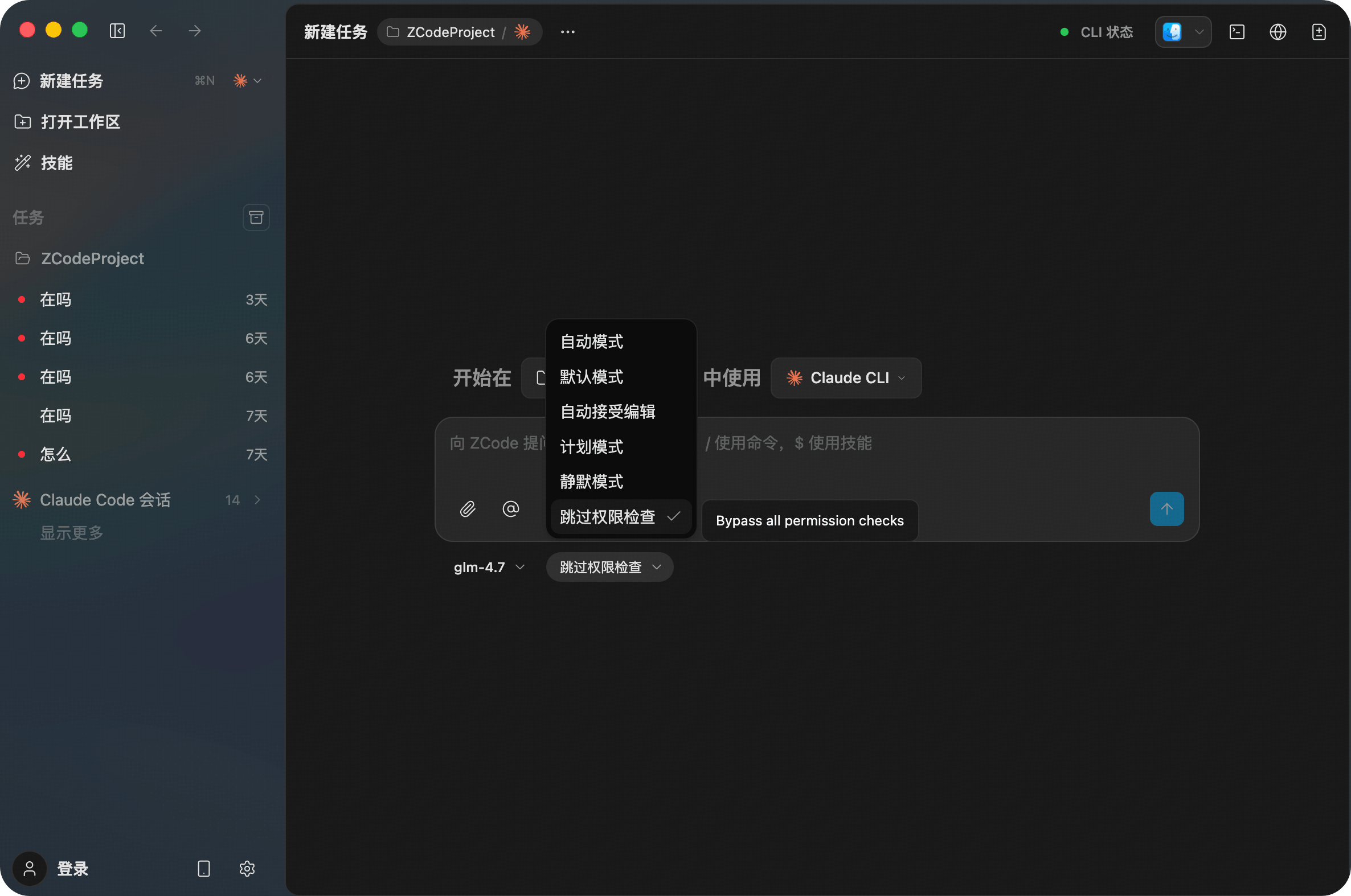
The core interaction feature of Z Code. For every query, you can fine-tune configurations including AI model selection, permissions, file context uploads, and enabling Thinking Mode. This mechanism is designed to give you full control over every specific action the Agent takes, adapting to the complex needs of different tasks.
Permission Modes
Permission modes control the operational scope of the AI Agent. Switching between different modes helps users find the optimal balance between efficiency and security.

Action Types
Key Agent operations are categorized into: File Editing, Command Execution, Network Access, Search Permissions, etc.
Four Permission Modes
| Permission Mode | How it Works | Use Case |
|---|---|---|
| Always Ask | The Agent requests confirmation before any action (modifying files, executing commands, network access, etc.). | Complex or critical tasks where every change needs manual review. |
| Accept Edits | The Agent automatically modifies files but still requests permission for sensitive actions like command execution and network access. | When you trust the Agent's code generation accuracy and want to speed up coding while maintaining control over system-level operations. |
| Plan Mode | Before any action, the Agent understands requirements and creates an action plan. It displays the plan first and starts execution only after user confirmation. | When requirements are complex or hard to describe in one sentence, ensuring the Agent's understanding matches your expectations. |
| Bypass Permissions | The Agent automatically executes all operations, including file modifications, commands, and network access, without any intervention. | Higher security risk; recommended only in trusted, isolated environments. |
Shortcut: Use
Shift + Tabin the chat box to quickly cycle through modes.
Attach Files
Introducing specific files into your requests improves the Agent's efficiency in locating and processing them.

Two Ways to Attach
| Method | Description |
|---|---|
| Attachment Button (π) | Upload local files (images, code, or other types). |
| @ Button / Type @ | Reference MCP, Folders, Agents, or Skills. |
Note: Some models do not have multi-modal capabilities. Even if images are selected, the model may not understand them correctly. Please use with discretion.
Thinking Mode
Thinking Mode determines whether the Agent performs additional analysis and self-correction before responding. Users can dynamically adjust this based on task complexity to balance response speed and output quality.

Mode Comparison
| Status | Description |
|---|---|
| ON | The Agent starts an internal "Think-Correct" loop before execution to plan and optimize the task. This adds slight latency but significantly improves code accuracy, robustness, and logic. |
| OFF | The Agent processes your instructions immediately for the fastest response. |
Usage Recommendations
- Simple Tasks (Quick code generation, bug finding) β Turn Thinking Mode OFF.
- Complex Tasks (Architectural refactoring, fixing deep bugs) β Turn Thinking Mode ON.