Skill
Skill 是一组可复用的工作说明。它通常用一个 SKILL.md 描述触发场景、处理步骤和输出要求,让 Agent 在遇到特定任务时按同一套标准执行。
在 ZCode 中,当前建议优先围绕 ZCode Agent 沉淀技能:
- ZCode Agent:适合在 ZCode 内置 Agent 中使用,推荐放项目开发、文档协作、测试验证、飞书工作流等常用能力。
管理技能
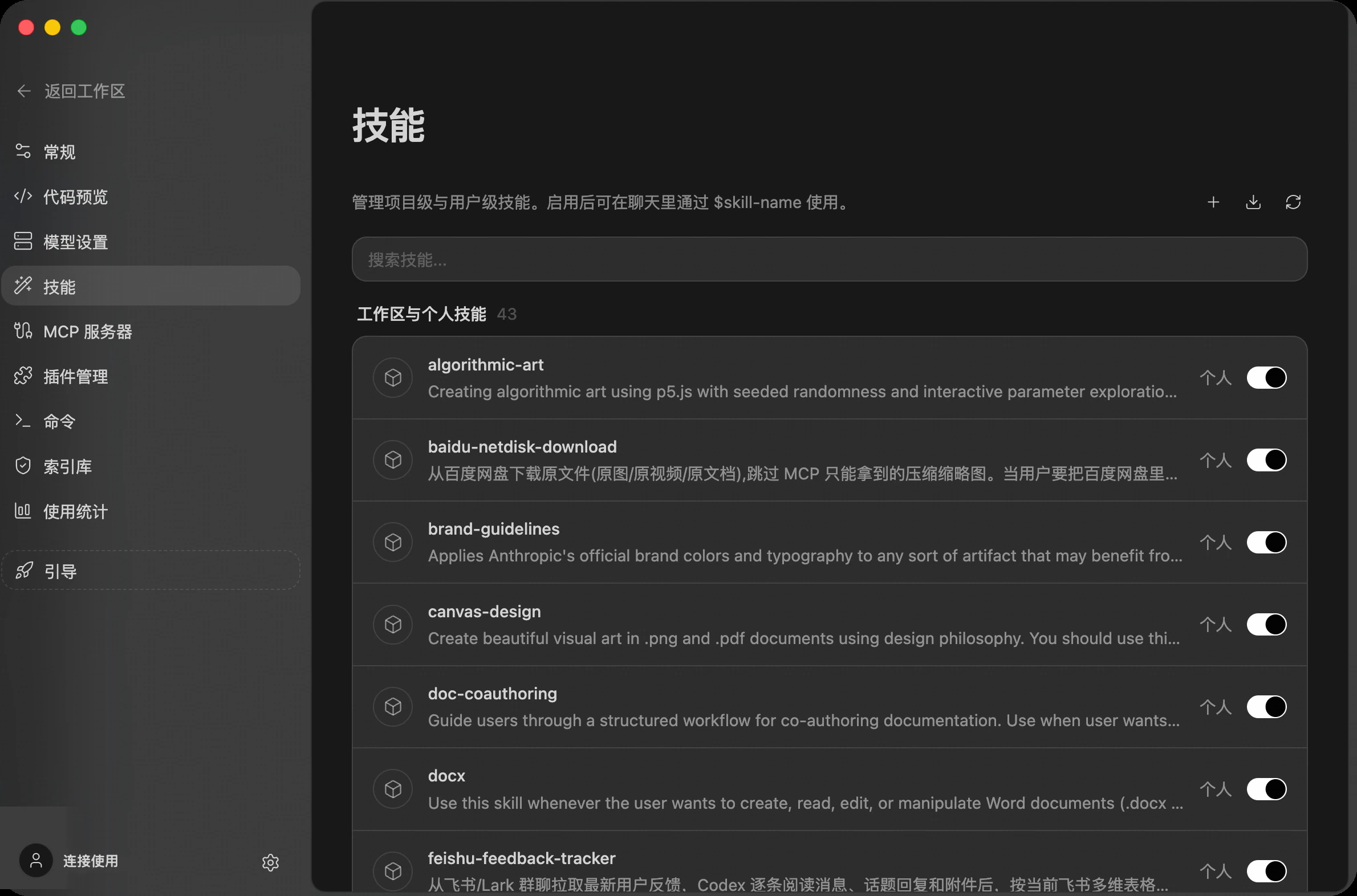
进入 设置 -> 技能 后,可以按来源查看技能。列表里会展示技能名称、来源标签、描述和启用开关。
你可以在这里完成几件事:
- 通过搜索框按名称筛选技能。
- 使用右侧开关启用或停用技能。
- 点击右上角 新建技能,ZCode 会引导你在聊天中用 Agent 生成一个新技能。
创建技能
一个技能本质上是一个目录加一个 SKILL.md 文件。目录名就是技能名,聊天中也会用这个名字引用。
ZCode Agent 的用户级技能目录:
~/.zcode/skills/<skill-name>/SKILL.md
一个最小可用的 SKILL.md 示例:
---
name: code-review-checklist
description: Review code changes with a focused checklist for correctness, regressions, tests, and maintainability.
---

# Code Review Checklist

Use this skill when reviewing a pull request, merge request, or local diff.

Focus on correctness, regressions, missing tests, risky API changes, and maintainability.
创建或修改后,回到 设置 -> 技能 点击 刷新,确认技能出现在对应来源下,并保持开关开启。
格式限制
- frontmatter 必须包含
name和description,缺失时该技能会被忽略,并在设置页的诊断里给出原因。 description上限 1024 字符。超出后整个技能会被丢弃(诊断显示「description 超过 1024 字符」),不是截断——请把长说明放进正文。SKILL.md正文超过 100KB 时会被截断加载。
技能数量与上下文占用
每轮对话会把所有已启用技能的元数据(名称 + 描述摘要,单条描述最多 250 字符)注入模型上下文,正文只在技能被调用时按需加载。全部技能的元数据共享一个固定预算:安装大量技能导致超出预算时,注入会降级为只保留技能名,模型将难以判断何时该用哪个技能,自动触发率会明显下降。建议只启用常用技能——停用的技能不注入上下文、也不能被调用。
「/ 面板里能看到,模型却不主动用」排查
/ 面板与模型看到的是同一份技能清单,不存在「只给面板、不给模型」的开关。技能在面板可见但模型不主动调用时,按以下顺序排查:
- 元数据被降级:技能装得太多、超出上述预算后,模型只能看到技能名(描述丢失),自动触发率骤降——停用不常用的技能即可恢复。
- 描述写得太泛:
description没有写清「什么时候用」,模型无从判断。触发条件写得越具体,自动触发越可靠。 - 在子智能体里:子智能体定义文件若声明了自定义
tools白名单,技能工具可能不在允许列表内,子智能体便无法调用任何技能——删掉tools字段或把技能工具加入白名单。 - 所属插件被停用:插件停用后其技能立即从会话移除,面板列表刷新可能略有延迟。
分发技能
ZCode 没有独立的技能市场。想把一组技能分发给团队,可以把它们打包成插件(skills/<技能名>/SKILL.md 的单层目录结构),通过插件市场分发——插件市场支持自建源(GitHub 仓库、git URL 或本地目录)。注意插件内的技能必须放在单层目录下,嵌套分组目录里的技能不会被 Agent 识别。
从外部 Agent 导入技能
如果你已经在 Claude Code、Codex CLI、OpenClaw、Augment、Windsurf 等其他 AI 编程工具里维护了技能,不必在 ZCode 里重新创建。在 设置 -> 技能 页面右上角点击 导入 图标,ZCode 会自动扫描这些外部 Agent 的技能目录,列出可一键导入的技能。
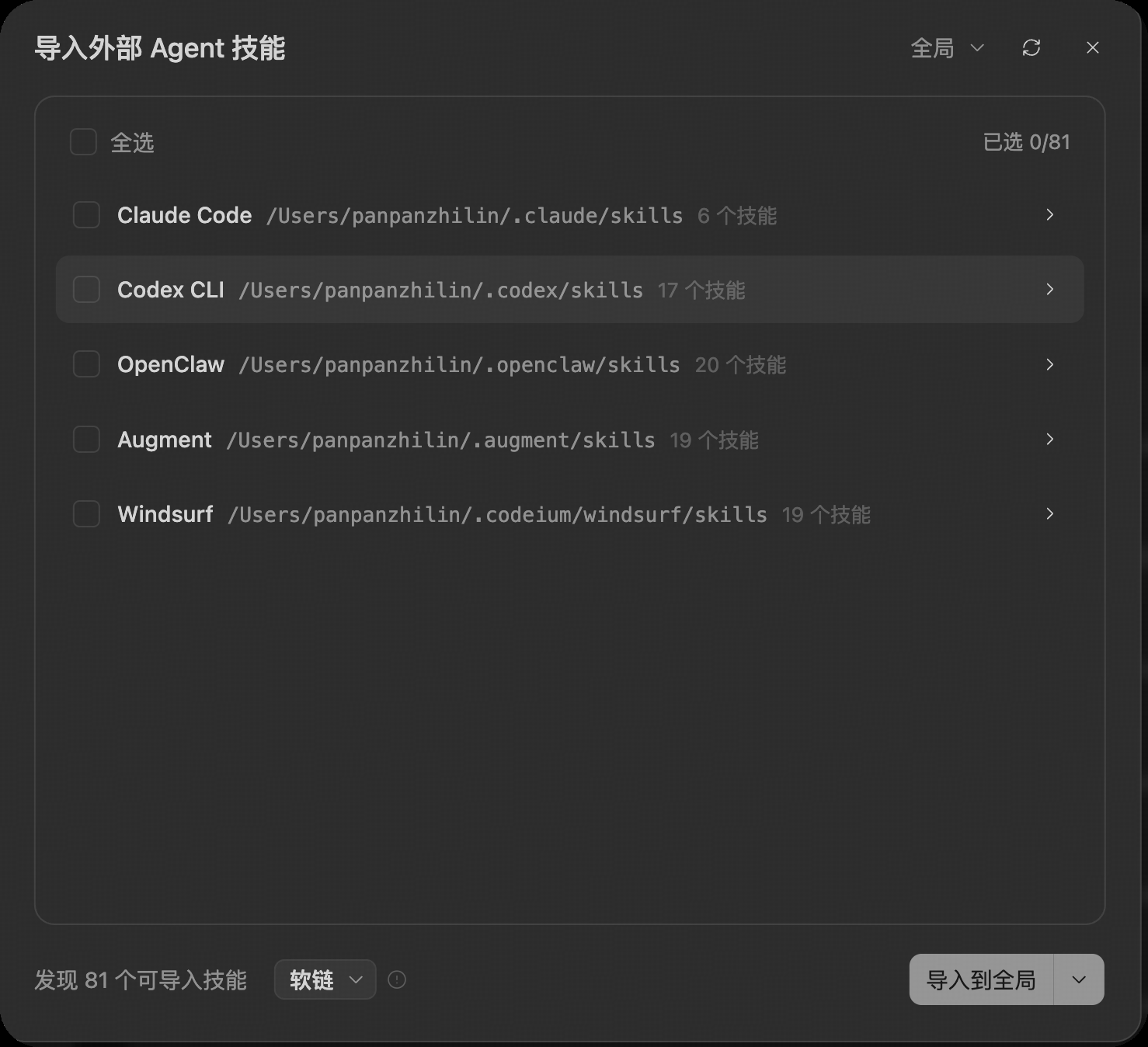
在弹窗中可以:
- 按外部 Agent 分组查看检测到的技能,每个来源会显示对应的技能目录路径和可导入数量。
- 勾选需要的技能,或使用 全选 批量选择,顶部会实时显示已选数量。
- 选择 导入方式:
- 软链:创建指向外部技能目录的链接。ZCode 会跟随来源目录的后续变更,但该技能依赖来源路径持续可用。
- 复制:把技能复制成 ZCode 内的独立副本,与来源解耦,来源后续的修改不会再同步过来。
- 选择 导入目标:导入到 全局(用户级,所有工作区可用)或导入到当前 项目(仅当前工作区可用)。
确认后即可完成导入。导入的技能会出现在技能列表中,和自建技能一样可以启用、停用,并在聊天中通过 $skill-name 调用。
在聊天中使用
在输入框中输入 $,选择需要的技能。选中后,技能会以标签形式出现在输入框里,你可以继续补充具体需求。
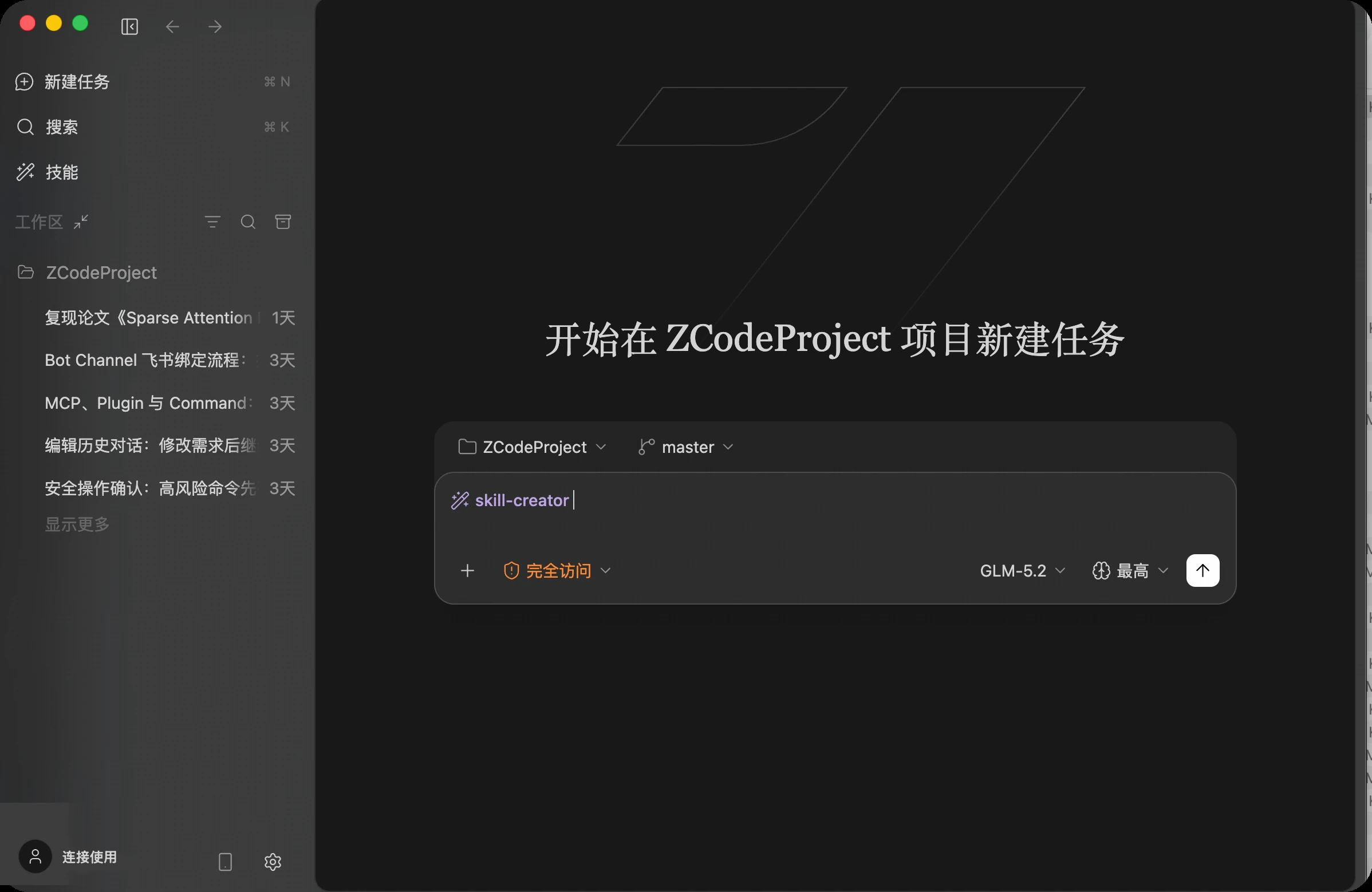
比如:
$code-review-checklist 帮我 review 当前改动
$release-notes 根据这次提交写一版发版说明
ZCode 会把被引用的技能交给当前 Agent,让它按技能里的说明处理任务。
除了 $,斜杠菜单里也有「技能」分组,输入 / 后同样能找到它们。
内置的配置向导技能
ZCode 自带一个 zcode-configuration-guide 技能,随应用安装、默认启用,不用自己配。它把技能、命令、MCP、Hooks、插件和 AGENTS.md 这六类扩展的配置位置、作用域和冲突规则整理在一处:
$zcode-configuration-guide 我想给这个项目加一个只在本仓库生效的命令,该放哪
配套还有几个诊断技能,专门排查扩展不生效的问题——技能没被识别、命令调不出来、MCP 连不上、Hooks 没触发、插件装不上,都可以让 Agent 帮你从症状一路查到修复办法。
把技能同步到远程主机
用户级技能存在本机,远程工作区里的 Agent 默认看不到它们。连上 SSH 或 WSL 远程后,可以在工作区标题栏的 同步 下拉里选择 同步 Skill,把它们复制到远端。详见 远程开发 → 把本地配置同步到远端。
适合沉淀成 Skill 的内容
- 任务有固定流程,例如 code review、接口排查、发版说明、测试报告。
- 团队对输出格式有固定要求。
- 任务需要附带背景知识、检查清单、模板或示例。
- 同一个能力会在多个项目或多次对话里重复使用。
如果只是保存一句简单提示词,可以优先使用 Command;如果需要一套完整工作方法,就更适合做成 Skill。